
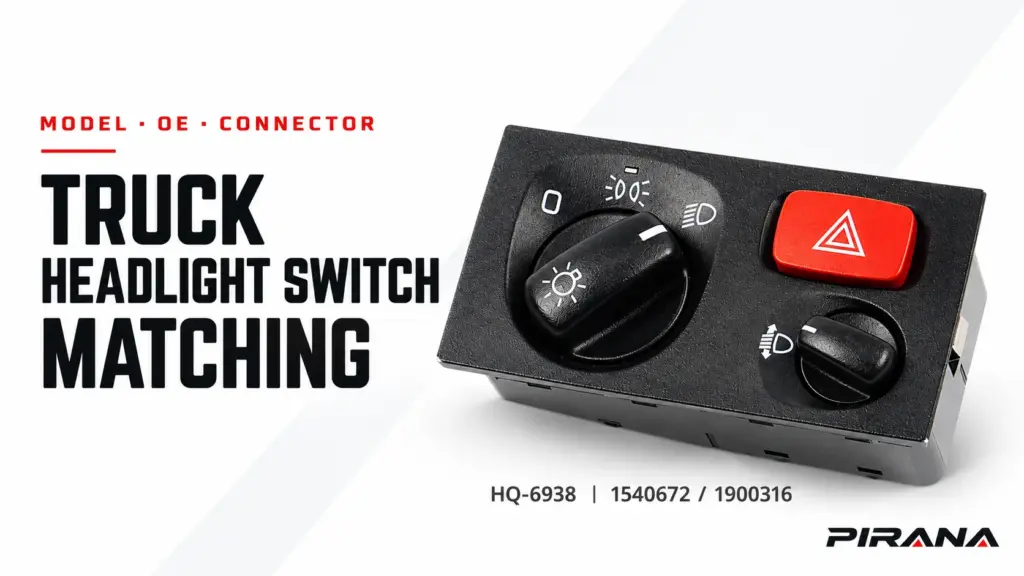
To match a truck headlight switch to a model and connector, start with the exact truck configuration, then verify the complete OE reference, the required lighting functions, the rear connector and the approved application record. Use the truck model only to narrow the search. Treat the switch face, a shared OE number or an equal pin count as screening clues until the physical interface and documented application agree.
That order matters because a correct-looking switch can fail at several different points. It may share a model-family label but belong to another build, market or equipment package. It may provide the right lighting controls but the wrong harness interface. It may show both of two OE references even though their replacement relationship has not been defined. Or it may be a plausible catalogue candidate with no rear-view evidence at all.
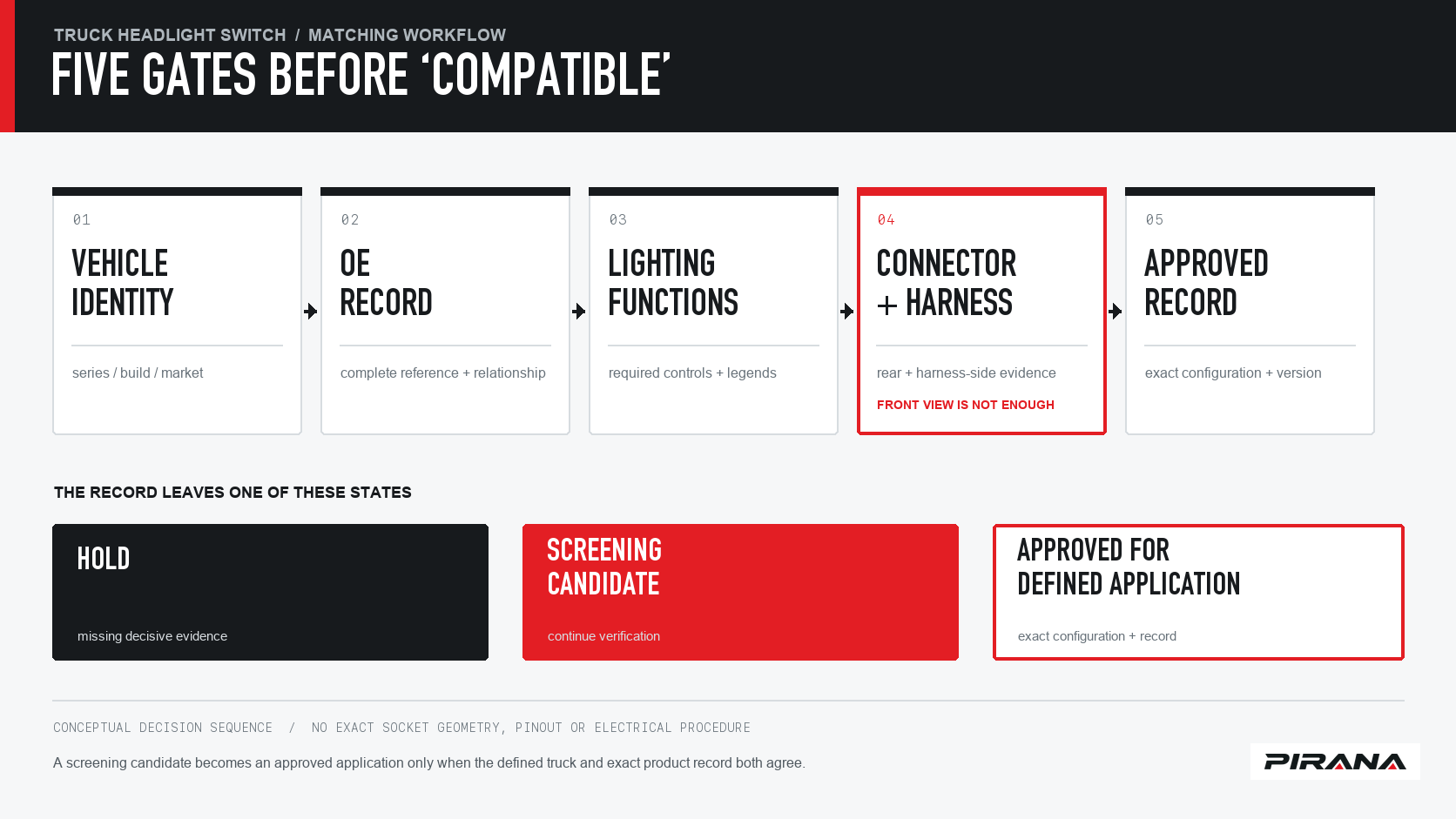
Use five evidence gates instead of one visual comparison
A reliable headlight-switch match moves through five gates. Each gate answers a different question, and none cancels a failure in another gate.
| Gate | Question to answer | Evidence to retain | Decision if incomplete |
|---|---|---|---|
| 1. Truck identity | Which exact truck configuration needs the lighting control? | Make, series or platform, generation or build condition, market and relevant cab or equipment details | Hold until the model is precise enough |
| 2. OE record | Which complete original reference is being replaced, and how is every displayed number related to it? | Original label, complete OE string, second reference or supersession source, and the PIRANA candidate number | Hold; do not merge similar-looking numbers |
| 3. Function set | What must the switch control in this truck? | Face layout, legends, lighting functions, hazard or level-adjustment controls where applicable, and vehicle-side requirements | Hold until the visible and functional requirements are listed |
| 4. Physical interface | Will the switch and harness meet correctly? | Front, rear, connector and harness-side photographs; connector count, outline, keying, latch, cavity and populated-contact observations; mounting evidence | Hold; appearance alone is insufficient |
| 5. Approved record | Has this exact product version been accepted for the defined configuration? | Approved sample, drawing or application record, revision and order-release criteria | Candidate only until approval is documented |
A candidate that fails any gate should not be described as compatible merely because the other four gates look plausible.
Start with the truck model, generation and application market
“Scania,” “Volvo,” “MAN,” “DAF” or “Mercedes-Benz” is a make, not a complete vehicle identity. The same family name can be used across generations, cab specifications, steering configurations, equipment sets and markets. Add the information that changes how the vehicle is configured.
For a truck-headlight-switch enquiry, begin with:
- truck make and exact series or platform;
- model year, build date or a production break when the vehicle catalogue distinguishes one;
- destination or application market;
- cab or trim where the lighting controls are option-dependent;
- the lighting and cabin functions controlled by the original unit;
- the original part label and a photograph of the complete installed location.
The last point helps expose a mismatch before the part is removed. A switch shown in one dashboard or fascia position may belong to a different control layout from another configuration. Scania’s public Bodybuilder Driver’s Manual makes the broader limitation explicit: “The information may differ depending on the vehicle’s specification.” Use that caution to confirm the exact vehicle configuration rather than assuming that a truck-family name defines one version.
For an aftermarket buyer, market belongs in the record even when the truck model name is familiar. Export and regional configurations can differ. If the available application source does not explain the build or market break, write unknown and keep the part in a screening state.
Interpret the OE reference without turning it into a fitment promise
The OE reference is the bridge between the original part and the catalogue record. Copy the complete identifier from the label, invoice, vehicle parts record or the original switch. Preserve letters, separating characters, spaces and suffixes exactly as shown.
The reference performs three useful jobs:
- It confirms which original part is being discussed.
- It can connect the request to a PIRANA candidate record.
- It gives both sides a stable identifier for checking relationships and revisions.
A number shown beside another number has no automatic meaning. Two references may be alternative identities from different catalogue systems, one may supersede the other, one may be a partial shorthand, or a supplier may simply group related entries. The replacement direction and any date or equipment condition need their own evidence.
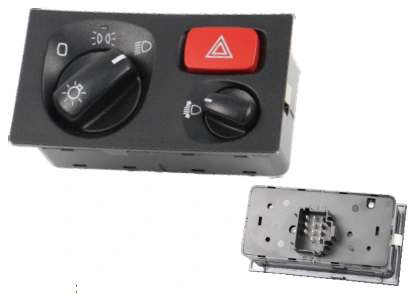
For the PIRANA HQ-6938 headlight switch, the current product record displays HQ-6938 as the PIRANA part and 1540672 1900316 as OE references. It names Scania at the vehicle-brand level. The same record shows series/model and year as To confirm and states that catalogue application information is a reference, not a guarantee of fitment.
That is useful, but it is intentionally incomplete. It does not show a documented Scania generation or year range, and it does not define whether 1540672 and 1900316 are two expressions of one application, a directed replacement pair or another catalogue relationship. Preserve both complete references, ask for the relationship where it affects the order and keep the part at screening status until the exact application is checked.
Do not normalize a reference by deleting a suffix just to obtain a match. Keep two columns:
| Form | Purpose |
|---|---|
| Display form | Exact label value for the quotation, order and approval record |
| Search form | A normalized copy only when a catalogue or spreadsheet needs one |
The display form remains the controlling value.
List the required lighting functions before comparing the switch face
The control face can shortlist a candidate, but it cannot establish the vehicle-side function set. Record the controls the truck actually requires and compare them with the exact candidate.
A commercial-truck headlight-switch assembly may include some combination of parking or side-marker selection, dipped and main-beam selection, fog or auxiliary lighting, instrument illumination, headlamp levelling or a hazard-warning control. Which functions apply depends on the vehicle specification. Do not infer a function merely because an unlabeled control location looks similar.
The supplied HQ-6938 image shows the front control face with a main rotary control, a red hazard-warning button and a separate control at the lower right, together with the product number and two catalogue references. Those visible elements are useful for identity confirmation. They do not reveal the internal contact arrangement or prove that each control performs a particular function on every Scania configuration.
Build a function row for every required control:
| Required function | Original switch evidence | Candidate evidence | Status |
|---|---|---|---|
| Main lighting selection | Face photograph and applicable vehicle description | Candidate face and product data | Match, conflict or unknown |
| Dip/main-beam or auxiliary control | Visible legend and applicable vehicle description | Candidate face and approved drawing | Match, conflict or unknown |
| Hazard warning | Original button/layout | Candidate face and approved function record | Match, conflict or unknown |
| Level adjustment or another cabin function | Original switch and vehicle equipment | Candidate control layout and approved drawing | Match, conflict or unknown |
| Illumination or market-specific legend | Original installed view and document | Candidate sample and target-market requirement | Match, conflict or unknown |
Function-list agreement is still only one gate. If the candidate provides fewer controls, adds a control that is not wanted or uses the wrong legend for the destination market, request a different variant rather than hiding the difference under a broader vehicle-family label.
Compare the rear connector and harness as physical evidence
The rear connector is where many apparently similar switches diverge. A front photograph cannot establish the mating face, latch position, keying or number of populated contacts. Neither can a sales listing that shows only the control face.
Request a matched evidence set from both the original and the candidate:
- a complete front view with readable markings;
- a straight-on rear view of the complete housing;
- a close, focused view of every connector opening;
- the same views taken from a consistent orientation;
- photographs of the harness plug while it is disconnected, without bending or damaging the latch;
- mounting clips, guides, screw bosses and the surrounding fascia;
- the original label and complete OE reference.
Then compare the physical features that the images actually show:
| Feature to record | Why it matters |
|---|---|
| Connector quantity and location | A similar switch face may carry a different number or placement of interfaces |
| Housing outline and orientation | Two plugs can look alike until their keying or projected shape is compared |
| Keying and latch | These features can prevent a connector from seating correctly |
| Total cavities versus populated contacts | Empty moulded positions and fitted terminals are different observations |
| Mounting points and fascia fit | The electrical assembly may also need to seat and retain correctly |
| Harness connector and terminal condition | The vehicle-side evidence is part of the interface, not just the replacement part |
Photographs support screening; they do not replace a drawing or approved sample where dimensions, contact population and internal construction matter. Do not use probe points, jumpers, terminal numbering or voltage readings from this article. Those procedures require the applicable truck wiring information, test method and safe working practice.
The most important limitation is specific to the supplied product image: it is a front view. It can help identify the HQ-6938 control layout and printed references, but it does not show the rear connector. Until a rear-view drawing or photograph tied to HQ-6938 is available, connector compatibility remains unresolved.
Separate the four decision states
Use language that matches the evidence. This prevents a useful shortlist from becoming an accidental fitment claim.
| Decision state | Evidence condition | Appropriate action |
|---|---|---|
| Hold | A decisive vehicle, OE, function or connector field is missing | Request the missing evidence; do not quote it as confirmed replacement |
| Screening candidate | Model family, reference and visible control layout are consistent enough to continue | Request rear views, a drawing and the approved application record |
| Configuration mismatch | A documented reference, function or physical-interface detail conflicts | Remove the candidate and request a different variant |
| Approved for defined application | Exact truck configuration, product version, functions and interface are documented, and the required approval or sample check is complete | Release only for the recorded configuration and revision |
“Screening candidate” is a useful internal or purchasing status. It is still not a recommendation to install. The approved state is narrower: it names the truck, its build or market condition, the exact PIRANA part, the switch position and the required functions.
Apply the method to PIRANA HQ-6938
The current PIRANA catalogue gives the example a concrete starting point:
| Matching field | Current evidence | What it establishes |
|---|---|---|
| PIRANA part | HQ-6938 | Candidate product identity |
| Displayed OE references | 1540672 and 1900316 | Catalogue search identifiers |
| Vehicle brand | Scania | Brand-level catalogue association |
| Series/model | To confirm | Exact truck family still unresolved |
| Year/build | To confirm | Production scope still unresolved |
| Product face | User-supplied front image | Visible control layout and printed references |
| Rear connector | Not shown in the supplied image or public field set | Interface comparison still needed |
| Function set | Face controls visible, vehicle requirement not supplied | A working function list must be completed |
| Approved application | Not established by the public catalogue fields | Do not promote to confirmed fitment |
This worked example shows why the question should not stop at “Does HQ-6938 list my OE number?” A more useful enquiry states the exact Scania series and build, shows both sides of the original connector, lists the required functions and asks for the documented application boundary of HQ-6938.
The HQ-6938 record also demonstrates two possible catalogue mistakes:
- Treating the vehicle brand as a model range. “Scania” is recorded, while the exact series/model remains open.
- Treating two displayed references as automatic substitutes. Both belong in the identification record, but their relationship still needs confirmation where it changes the purchasing decision.
Neither mistake requires inventing a fitment rule. Both are resolved by keeping unknowns visible and requesting the relevant evidence.
Build a copy-ready matching record
Use one record for the original part, the candidate and the approval decision. The format works for a quotation, a distributor’s catalogue review or a private-label sample development project.
Truck make:
Series or platform:
Model year, build date or production break:
Application or destination market:
Cab, trim or equipment details:
Original switch position and visible controls:

Complete OE/reference copied from the original part:
Second or related reference shown, if any:
Reference relationship and supporting source:
Original label photograph:
PIRANA candidate part number:

Required lighting and warning functions:
Required illumination or market-specific legend:
Candidate front-image comparison:

Connector quantity and location:
Rear housing outline:
Keying and latch observations:
Total cavities and populated contacts:
Mounting points and fascia fit:
Complete rear and harness-side photographs:
Drawing or approved sample reference:

Unresolved evidence:
Decision:
HOLD / SCREENING CANDIDATE / CONFIGURATION MISMATCH / APPROVED FOR DEFINED APPLICATION
Approval condition and revision:
Required quantity and destination:
A blank field is ambiguous. Write unknown, note how it will be checked and keep the decision at hold or candidate until that check is complete.
Send the evidence that lets a supplier answer precisely
Start with the PIRANA headlight-switch catalogue to identify the candidate family. If HQ-6938 is the likely candidate, use its product record for 1540672 / 1900316 and request confirmation of the same exact part.
Include the truck make, series or platform, build or model-year condition, application market, original OE label, front and rear photographs of both original and candidate, harness-side photographs, function list, required quantity and destination. Identify every unresolved field rather than asking only whether a switch “fits.”
Use the PIRANA request-for-quotation route when the record is complete enough to review. A precise request lets the response distinguish a catalogue candidate, a different variant and a documented application.
If the wider task is to understand where dashboard or cabin controls fit within the vehicle, read the truck cabin switch applications guide. It provides context for the assembly; this matching guide remains the owner of the model-and-connector decision.
References
- PIRANA, Headlight Switch — OE 1540672 / 1900316, HQ-6938, catalogued data checked 2026-10-22.
- PIRANA, Headlight Switch catalogue, accessed 2026-10-22.
- Scania, Bodybuilder Driver’s Manual, accessed 2026-10-22.
REFERENCED IN THIS GUIDE
Products mentioned in this article
These published catalogue references are included because they are discussed in this guide. A reference is a starting point for identification; confirm the exact OE number, connector and vehicle configuration before ordering.
Headlight Switches
Headlight Switch — OE 1540672 / 1900316
PIRANA Part No. HQ-6938 · OE: 1540672 1900316
View product
Headlight Switches
Headlight Switch — OE 20466304 / 20953573
PIRANA Part No. HQ-6942 · OE: 20466304 20953573
View product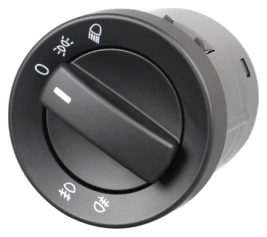
Headlight Switches
Headlight Switch — OE 81255056877 / 81255056990
PIRANA Part No. HQ-6953 · OE: 81255056877 81255056990 81255056932
View product