A truck window switch that does not work is a symptom, not a confirmed failed switch. Determine which window and direction fail, test every applicable control location and record the operating state before ordering a replacement. Then compare the results with the truck’s service information.
The useful output of diagnosis is one of three dispositions:
- Continue diagnosis with the next check named in the applicable vehicle procedure.
- Hold because a vehicle, circuit, function or service document is unresolved.
- Begin part review only when the evidence supports a fault in the switch assembly and the complete original-part identity is recorded.
Those outcomes are deliberately different from a cause list. A switch can be defective, but supply or ground, a connector that is not fully seated, a window-lock state, a motor or regulator, a door or body controller, communication, or lost learned position can produce a similar complaint. The applicable truck and system determine which possibilities are relevant. PIRANA’s quality guidance likewise separates confirming the exact product identity from the later physical and functional checks.
This guide does not provide a universal fuse chart, pinout, probe point, voltage or resistance value, direct-power test, initialization sequence, coding procedure or disassembly instruction. Those details differ by truck, build configuration and control architecture. Obtain the current service information for the exact vehicle before performing tests that require them.
Start with the diagnostic split, not the replacement
The table below turns a short complaint into a narrower question. It describes what an observation can help investigate; it does not identify the failed component.
| What the driver reports | What to compare before assuming a switch fault | What the observation does not prove | Diagnostic direction |
|---|---|---|---|
| One control location fails; another works | The complete affected window or function, attempted from every control that is supposed to operate it | That the non-working switch is defective, or that the working control shares the same command path | Use the vehicle procedure to trace the relevant command, supply and control path |
| One window fails from every applicable control | The window, directions, other functions on that switch and whether other windows still work | That a common symptom proves a local switch failure | Determine whether the affected function shares a supply, module, motor, regulator or communication path in this truck |
| One direction fails while the other works | The exact direction, control travel, window position and any partial response | That the switch face, one contact or the motor is the confirmed cause | Follow the vehicle-specific functional and circuit checks |
| Several windows or the complete door group fail | Which controls and functions stop together, and whether the condition is position or state dependent | That the master switch caused every affected function | Check shared system conditions and the documented architecture |
| The fault is intermittent | Time, vibration, temperature, door position, moisture and operating state at each occurrence | That an intermittent symptom is a loose wire, or that a visual inspection has excluded one | Preserve repeatability evidence and follow the service information for intermittent faults |
| The window moves manually but AUTO, one-touch or anti-pinch behaviour fails | Which functions remain, whether learned state or initialization is relevant, and the documented system checks | That basic movement confirms the complete replacement function | Check initialization, module and function-specific requirements for that truck |
| The window does not move and the switch feels wrong | Whether the button returns and travels normally, stated only as a visible or tactile observation | That the internal contact or complete switch is failed | Link the observation to the applicable electrical and mechanical checks |
Vehicle architecture matters. In one documented passenger-car system, the main switch, window motors and body control module communicate over LIN, while motor-integrated electronics participate in anti-pinch and fail-safe behaviour. That 2022 Mitsubishi Outlander example explains the system boundary; it is not a wiring description for a commercial truck. Mitsubishi TSB-21-42A-002, PDF page 3.
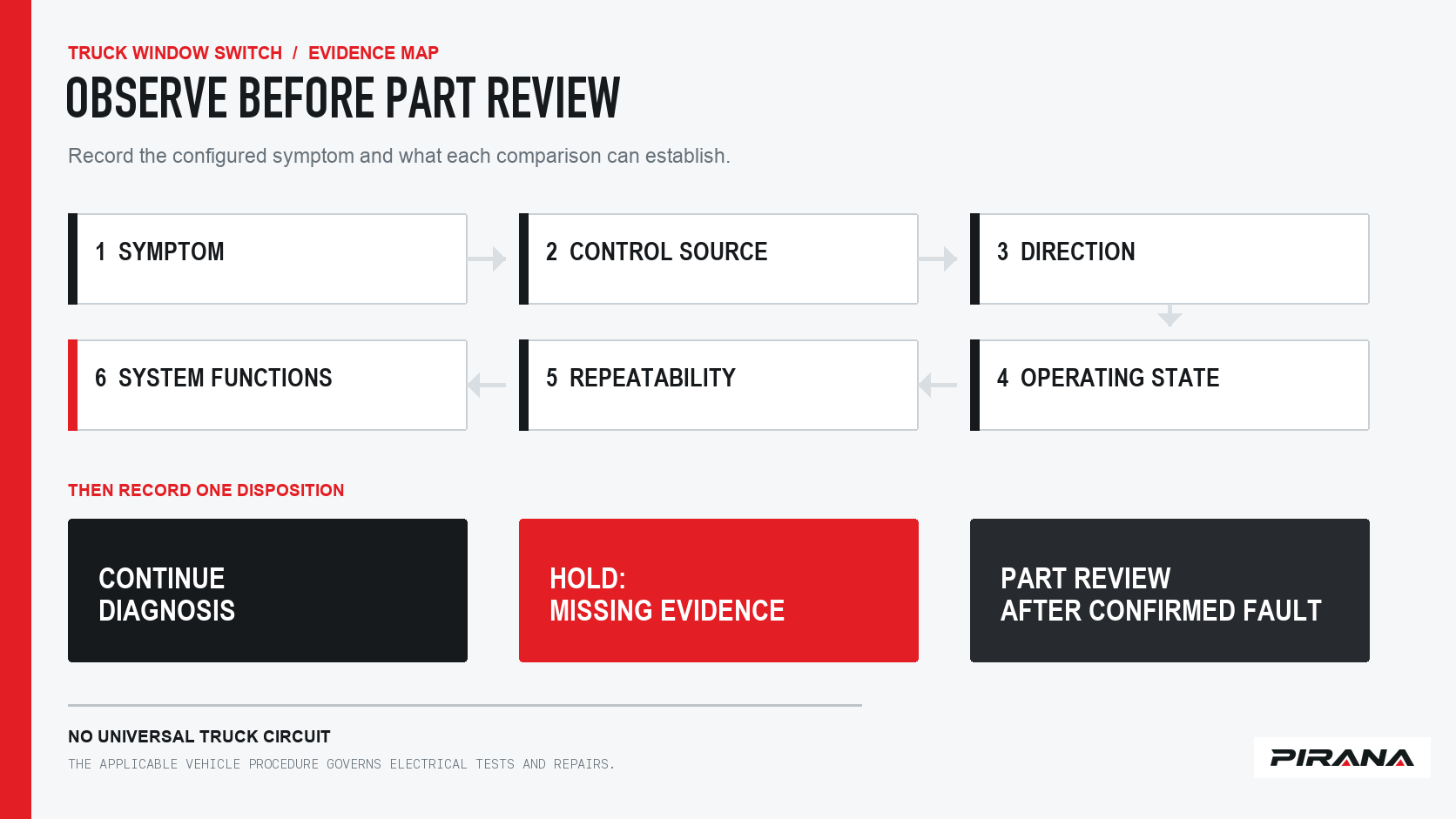
Step 1: Record a seven-field symptom fingerprint
A note that says “driver window not working” is rarely enough to compare results between two technicians or before and after a repair. Build a record that another person can reproduce.
| Field | Record this information | Why it changes the next check |
|---|---|---|
| 1. Vehicle and location | Truck make, series or platform, relevant production information, market, LHD/RHD, physical door and window position | The same broad model name can represent different generations and control configurations |
| 2. Exact failure | Windows and directions that fail; partial travel; noise or no response only when actually observed | “Not working” does not distinguish one function from a complete system |
| 3. Every applicable control | Which master, local or secondary control was operated and the result from each | A result from one location tests only that location under those conditions |
| 4. Operating state | The relevant ignition or power mode, door state, window-lock state, control used and window position | Many systems change enablement and available functions with vehicle state |
| 5. Repetition | Repeatable, intermittent or seen only once; include time, vibration, weather, temperature and door position where relevant | A named condition can guide reproduction without becoming a cause claim |
| 6. Scope of other functions | Other windows, window lock, door lock, mirror, illumination and assisted functions that belong to the vehicle | Shared and separate system boundaries differ by truck |
| 7. Change history | Recent battery work, module service, trim or door work, water exposure, prior repair or a new symptom | It records relevant context; it does not prove causation |
Keep facts separate from guesses. “The connector may be loose” belongs in a hypothesis column. “The harness-side lock moved when the connector was inspected by the approved procedure” belongs in the evidence column.
Do not write a customer’s full vehicle identification number into a public supplier enquiry. Use the identifiers the applicable parts or service process requires, and share sensitive vehicle information only through an appropriate channel.
Step 2: Reproduce the fault without changing the circuit
Use only checks that the current vehicle information permits for the truck, worksite and technician. Before touching an electrical interface:
- confirm that the truck is in the required operating state;
- identify the affected window, control location and direction;
- record every applicable control before disturbing a connector;
- note whether window lock, door state or another documented condition changes the result;
- stop if the window, mechanism, trim or electrical system behaves in a way that creates a safety risk.
Do not “test” a circuit by bridging terminals, supplying power directly to an unidentified pin or disconnecting a battery to see what happens. Those actions require an exact schematic, tool, procedure and configuration. Do not exercise an anti-pinch or other automatic closure function unless the applicable service document says how to test it safely.
The purpose of this step is to produce the strongest observed symptom, not to force every reported condition to recur at once.
Step 3: Compare every control and required function
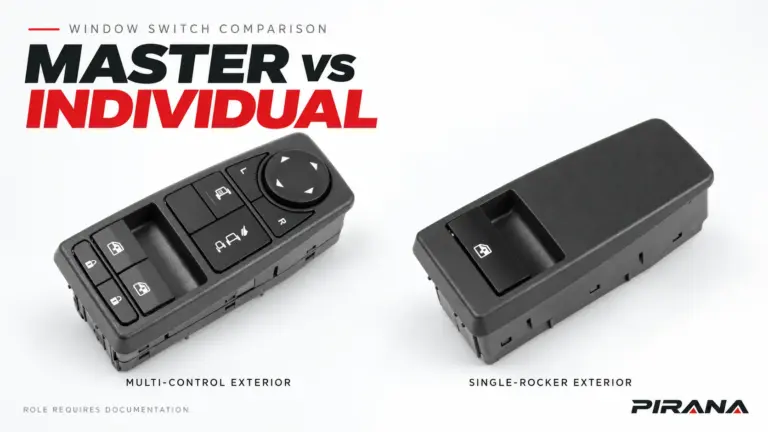
The control face can make two switch assemblies look related, but the useful comparison is functional:
| Comparison | Evidence to record | What it may help separate |
|---|---|---|
| Master versus local control | Result for the affected window from each control that is supposed to operate it | Whether the complaint is limited to one command location |
| Up versus down | Whether either direction moves the glass; any partial or abnormal movement | Which required function failed on this configured system |
| Affected window versus other windows | Which other windows still operate and from where | Whether the observed scope is local or shared |
| Locked versus unlocked state | The documented state used for the test and the result in each applicable state | Whether a deliberate inhibit state explains part of the complaint |
| Basic movement versus automatic function | Manual result and the specified automatic, one-touch, anti-pinch or other assisted-function result | Whether the remaining issue is in a later or learned system function |
| Integrated controls | Window lock, door lock, mirror, illumination or other functions actually fitted to the assembly | Whether all functions associated with one control area fail in the same way |
“Works from the master” or “works from the passenger door” is an observation, not a diagnosis. The next question is which command path, supply, enablement condition or module responsibility is common to the failing or working branches of this exact system.
Physical position also needs care. Left-hand drive or right-hand drive describes the steering configuration. Left or right describes the installed physical side. Driver or passenger is the result of combining those facts with the vehicle’s configuration. Do not convert “driver-side switch” into “left-hand switch” without checking the truck.
Step 4: Inspect visible connector and harness evidence
Where the applicable procedure permits visual access, inspect the switch, trim, mounting area, harness and both sides of the connector for visible damage, contamination, heat effects, disturbed retention or an incomplete latch. Record the condition before moving anything.
Do not use a “wiggle test,” terminal tug, back-probe or jumper as a shortcut. Even a simple continuity result needs the right connector face, pin function and expected state. A connector can appear populated while its retention is incomplete. Subaru’s August 2018 technician newsletter described an inoperative rear window on a 2014 Forester in which individual terminal anchors held, but a partially dislocated secondary lock allowed terminals to back away from the master-switch pins. Relocking the harness-side connector restored operation without replacing the switch. Subaru August 2018 TechTIPS, PDF page 1.
That single documented case does not establish how often connector retention causes truck faults. It shows why “the switch did not solve it” and “the connector was not seated” are different findings. Inspecting the mating interface can prevent a confirmed connector problem from being mistaken for a confirmed switch problem.
Photographs are useful after the relevant service procedure allows them. Capture the control face, the complete rear housing, the connector opening, visible markings and the surrounding harness without pulling it into a new position. Keep the photograph with the truck configuration; a cropped close-up cannot show what changed.
Step 5: Use the vehicle’s diagnostic evidence
At this point, move from general observations to the service information for the exact truck. Record:
- the vehicle configuration and any identifier the service process requires;
- the procedure and document edition used;
- the module, connector or test point named by that procedure;
- the required measurement conditions and limits, copied only from that applicable document;
- the observed result before interpreting it;
- whether a stored code, module data value or other result has a prerequisite, pending status or known external cause;
- which alternative explanations remain after the test.
A diagnostic trouble code is a diagnostic input. It does not automatically prove that the switch is defective. The same applies to a voltage reading, communication message or “no codes” result outside the conditions under which the system is designed to report the fault.
In a module-mediated window-control system, a switch command may enter a controller or communication network rather than directly energising a motor. The exact role of the switch cannot be inferred from its shape, pin count, an AUTO legend or another model’s wiring.
Step 6: Separate basic movement from learned or assisted functions
A window that moves after a repair or power interruption may still be incomplete.
Subaru Service Information 07-93-15, applying to 2015-MY-and-later Legacy and Outback vehicles with the Auto-Up/Down feature, states that battery disconnection disables Auto-Up/Down while the switches still control the windows, and that the applicable initialization must be completed for its named front-door switches. The same bulletin says testing of returned switch assemblies showed the vast majority were not failed as claimed. Subaru Service Information 07-93-15, PDF page 1.
That bounded example supports two practical distinctions:
- Manual movement does not test every function the vehicle is supposed to provide.
- A named vehicle can require a learned or initialized state after a specific event.
Those statements do not make Subaru’s sequence applicable to a commercial truck. Lexus also publishes a different, model-specific initialization procedure for a different vehicle and describes loss of position memory after removal of a fuse. Lexus L-SB-0035-14, pages 1–2. The difference is the point: initialization, relearning, coding and programming belong to the exact vehicle system, and the current service information must name both the required action and its completion check.
Toyota’s Recall C0M technical instructions further separate a symptom from a part outcome. Its operation flow begins with a configured-vehicle inspection and a preliminary operation check; its later inspection can reach different repair actions instead of replacing the complete assembly in every case. Toyota Recall C0M Technical Instructions, printed pages 2–5 (PDF pages 3–6). Do not carry that recall’s Toyota-specific tests or replacement expectations to another vehicle.
Separate evidence from conclusions
Use a consistent evidence status in the diagnostic record:
| Status | Meaning | Permitted next action |
|---|---|---|
| Observed | The plain result and relevant conditions were recorded | Repeat or compare under the applicable procedure |
| Documented | The applicable vehicle, part or service source states the requirement for this configuration | Use it within its stated scope |
| Supported hypothesis | Observations and applicable documentation make one cause plausible, but the result is not discriminating | Perform the next documented check; keep alternatives visible |
| Confirmed cause | A valid test supports the cause for this exact configuration and the relevant alternatives have been resolved as the service process requires | Follow the documented repair or replacement path |
| Excluded | The applicable check establishes that an item does not explain this complaint under the tested conditions | Stop considering that item for that scope |
| Unresolved | Evidence is absent, inaccessible, contradictory or outside the guide’s authority | Hold; name the missing evidence |
This vocabulary prevents “the switch might be bad” from becoming “replace the switch” merely because other checks have not yet produced an answer.
The three dispositions
Continue diagnosis
Continue when the next applicable OEM check is safe, available and capable of separating the remaining causes. Name the check, its expected result and how each possible result will change the action. “Check the wiring” is not a disposition; “perform the exact supply-and-ground check in service document X for configuration Y” is.
Hold
Hold when the truck configuration or market is uncertain, the current service document is unavailable, the required tool is absent, the connector or work area cannot be inspected safely, or a result could have several interpretations without more evidence. A hold protects both the vehicle and the parts decision.
Begin part review
Begin a part review only after evidence supports a fault in the switch assembly rather than another part of the control path. At that handoff, record the complete OE reference, visible revision, truck platform and production condition, market, LHD/RHD, physical side, front or rear position, switch role and required functions.
The OE-number and connector identification guide converts the removed-part information into a reviewable candidate. The brand and configuration selection guide checks the truck configuration. Neither a matching number nor a similar connector, by itself, proves fitment or that the replacement retains every function.
Once replacement is technically justified, the truck power-window-switch replacement and verification checklist covers authorization, identity, installation, commissioning and post-installation acceptance. The quality-inspection checklist covers sample and incoming-lot inspection.
Copy-ready diagnostic record
Use unknown instead of a blank when evidence is missing.
Record date / person completing the record:
Truck make, series or platform / production information:
Market / LHD or RHD / physical side / front or rear:
Affected window and switch role:

1. Exact symptom:
   Failure / direction / partial response / observed sound:

2. Controls tested:
   Master result:
   Local or secondary control result:
   Other applicable control result:

3. Operating state:
   Ignition or power state:
   Door state:
   Window-lock state:
   Window position / other documented precondition:

4. Repeatability:
   Repeatable / intermittent / once / unknown:
   Time, temperature, vibration, moisture or other trigger:

5. Scope:
   Other windows:
   Window lock / door lock / mirror / illumination:
   Automatic or assisted function:

6. Visible interface evidence:
   Switch, trim and mounting:
   Harness:
   Connector both sides:
   Photographs stored:

7. Vehicle diagnostic evidence:
   Applicable service document and edition:
   Procedure or test point:
   Required conditions and limit:
   Observed result:
   Other causes still unresolved:

Evidence status: OBSERVED / DOCUMENTED / SUPPORTED HYPOTHESIS / CONFIRMED / EXCLUDED / UNRESOLVED
Disposition: CONTINUE DIAGNOSIS / HOLD / BEGIN PART REVIEW AFTER CONFIRMED FAULT
Next check or missing document:
Apply the result before choosing a part
A practical diagnosis links every conclusion to the evidence that supports it. When the evidence is incomplete, record that limitation. When it supports a switch fault, preserve the original reference and configuration so the purchasing decision can begin from an actual part record.
PIRANA’s power window switch catalogue is organised around OE references, application information, connector, switch position and required functions. If diagnosis has reached a supported part-review stage, submit the complete OE or PIRANA reference, truck details, relevant production and market information, front and rear photographs, connector photographs, required functions, quantity and destination through the quotation route. Mark any unresolved configuration field explicitly so the review addresses the actual truck rather than a front-photo similarity.
References
- PIRANA, Power Window Switch Catalogue, accessed 22 October 2026.
- PIRANA, Power Window Switch Quality Control, accessed 22 October 2026.
- Subaru of America, August 2018 TechTIPS newsletter, QMR of the Month, page 1.
- Subaru of America, Service Information 07-93-15: Unnecessary Power Window Switch Replacements, 23 July 2015, page 1.
- Mitsubishi Motors North America, TSB-21-42A-002: Updates to 2022 Outlander Power Window Control System, April 2021, page 3.
- Lexus, L-SB-0035-14: Initialization of Power Window During PDS, 31 July 2014, pages 1–2.
- Toyota, Technical Instructions for Safety Recall C0M: Power Window Master Switch, printed pages 2–5 (PDF pages 3–6).
REFERENCED IN THIS GUIDE
Products mentioned in this article
These published catalogue references are included because they are discussed in this guide. A reference is a starting point for identification; confirm the exact OE number, connector and vehicle configuration before ordering.
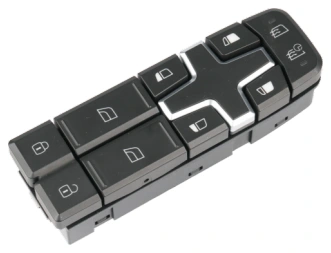
Power Window Switches
Power Window Switch — OE 22154285 / 22154235
PIRANA Part No. HQ-6913 · OE: 22154285 22154235
View product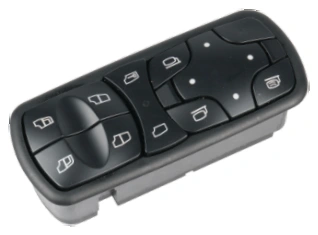
Power Window Switches
Power Window Switch — OE A9438200097
PIRANA Part No. HQ-6901 · OE: A9438200097
View product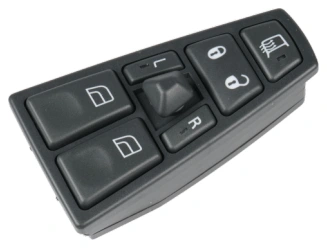
Power Window Switches
Power Window Switch — OE 21354601 / 21543897
PIRANA Part No. HQ-6908 · OE: 21354601 21543897 20752918 20452017 21277587 20455317 20568857 20953592
View product